v1.0.0Free downloadWindows and Linux
Sutraatman
A oneM2M Common Service Layer with a Management Console to register devices, store their data and manage it all from one place.
Free download for six months from 1 November 2026. See offer terms
What it is
One standard layer between your devices and your applications
Sutraatman (सूत्रात्मन्) implements the oneM2M Common Service Layer, the open standard for connecting IoT devices, gateways and applications, on the Release 2 resource model. An infrastructure node (IN-CSE) sits at the centre with middle nodes (MN-CSE) around it. Devices register once, push their data into standard resources, and any authorised application can read it, subscribe to changes or reach the devices through the CSE.
The Management Console shows the whole installation on a live map and an animated overview, and manages middle nodes, IoT units, users and access rights, with reports, logs and housekeeping in 23 languages, including Hindi.
Capabilities
What the CSE does
All twelve oneM2M common service functions, on the Release 2 resource model.
Security
Access control policies for create, read, update, delete, notify and discover. Originator checks, admin, per-AE and peer CSE keys, IP allow-list, rate limits and optional TLS.
Registration
Application entities and remote CSEs register with the CSE. Middle nodes keep their registration alive with a heartbeat.
Communication management
HTTP, MQTT, WebSocket and CoAP bindings, request routing between the infrastructure node and middle nodes, non-blocking requests and retries.
Device management
Node and management objects for firmware, software and reboot of field devices.
Discovery
Find resources by type, label, creation time, level or geographic area, with limits and paging.
Data management and repository
Containers and content instances with latest and oldest, size limits, retention, flexible containers and time series.
Group management
Groups with fan-out operations to every member and member validation.
Subscription and notification
Subscriptions with verification, event types, batching, rate limits, expiry counters and a retry queue.
Service charging and accounting
Usage counters per originator, quotas and a cost model.
Location
Location policies, geo-fence discovery and a network-based default.
Network service exposure
A gateway for device triggering, SMS and QoS style network services.
Application and service management
CSE and service lifecycle, statistics and housekeeping.
Supported protocols
Protocol bindings and default ports
HTTP and HTTPS are always on. MQTT (embedded or external broker), WebSocket and CoAP are switched on in the shipped configuration, and middle nodes can turn them on from the Add middle node dialog.
Management Console
Run the whole installation from the browser
Browser based, nothing extra to install. Every screen shows only what the signed-in user is allowed to see.
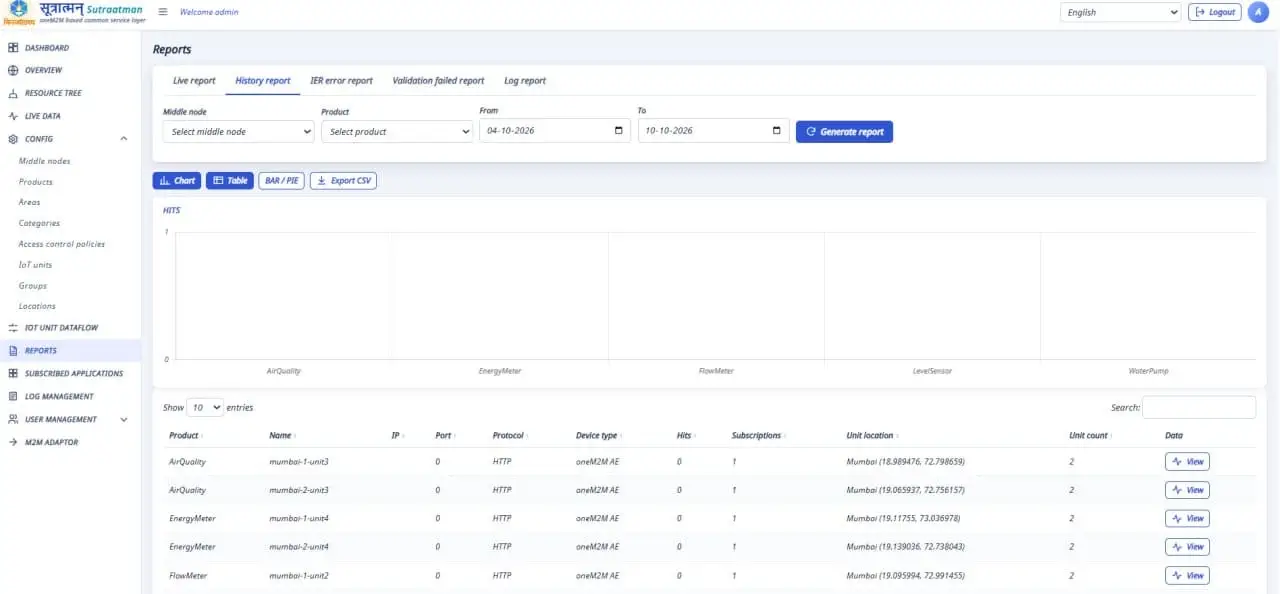
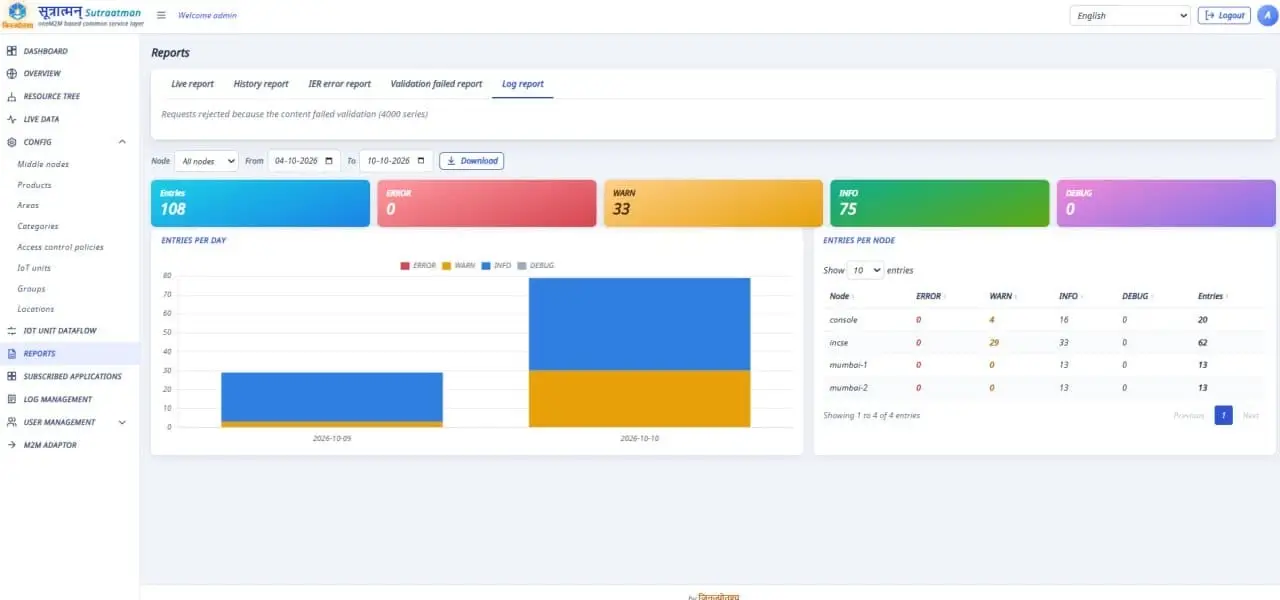
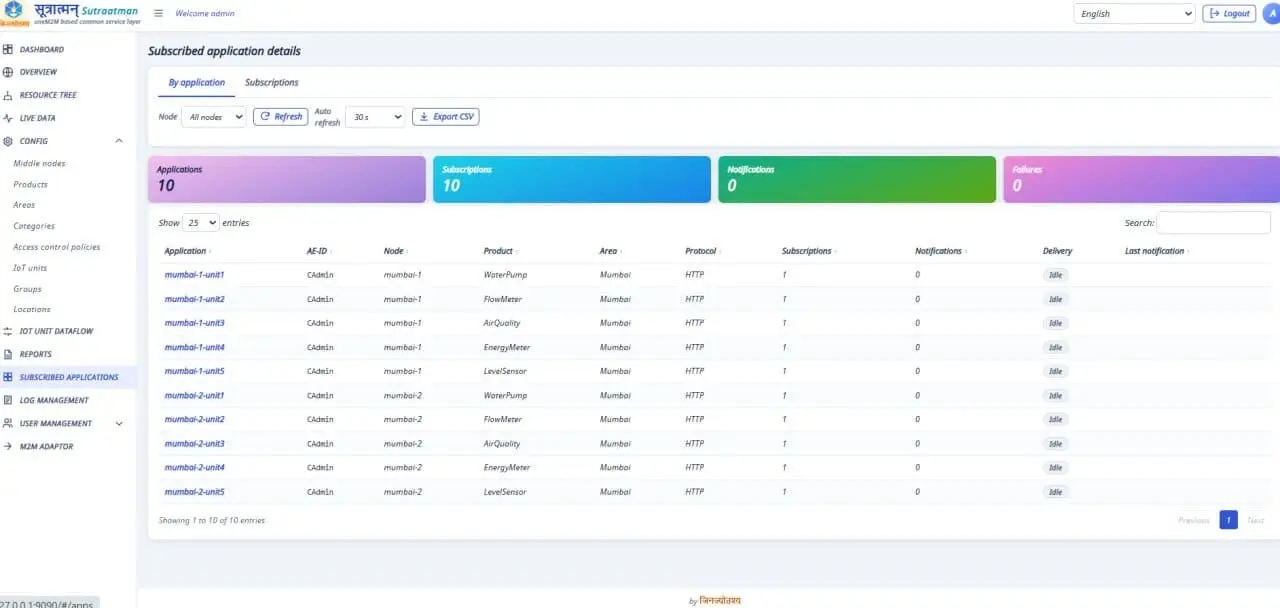
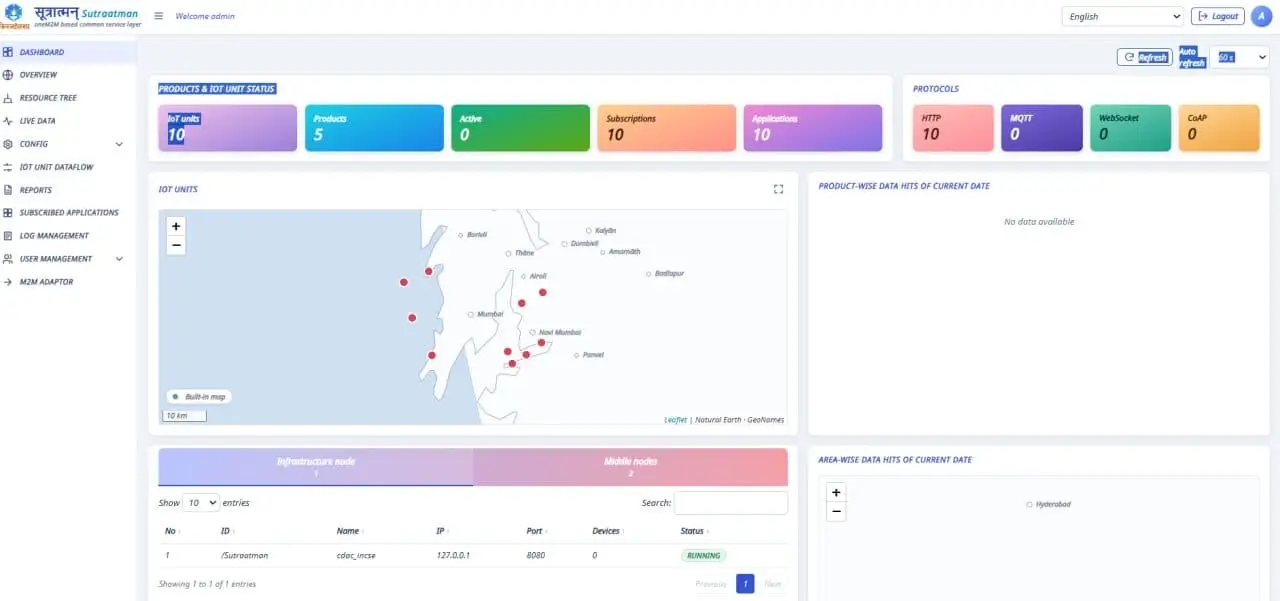
- DashboardLive map of every IoT unit, coloured by status and filtered by what the signed-in user may see.
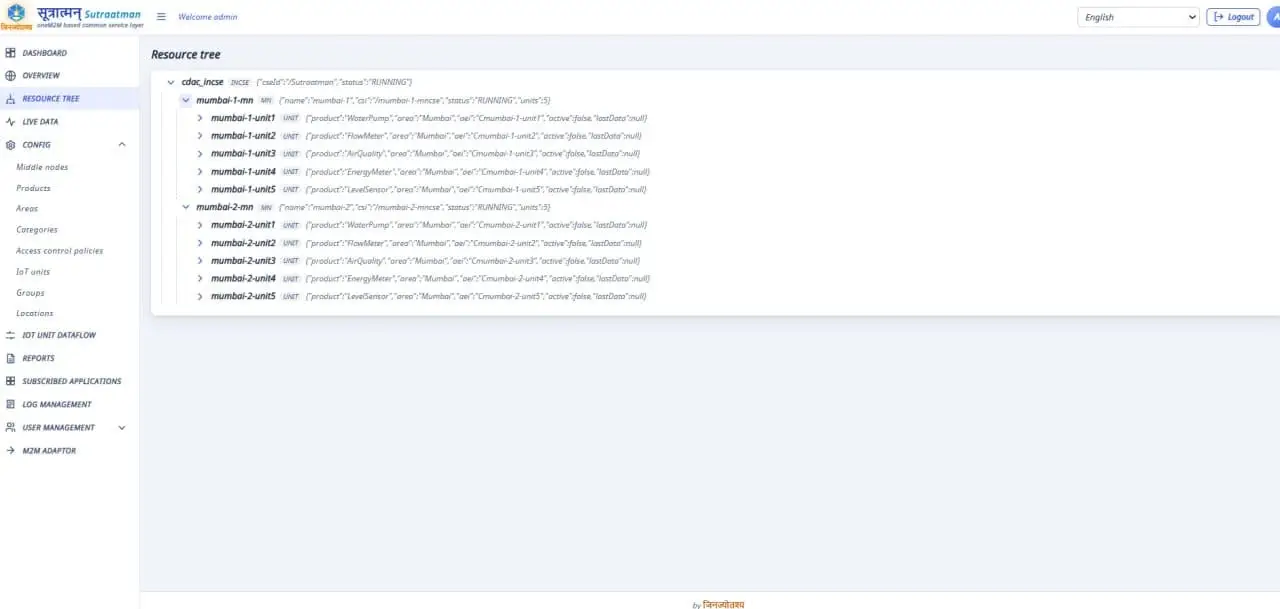
- OverviewAn animated picture of the infrastructure node, its middle nodes and their units, with data flowing along the links and alerts for stopped, unregistered or silent nodes.
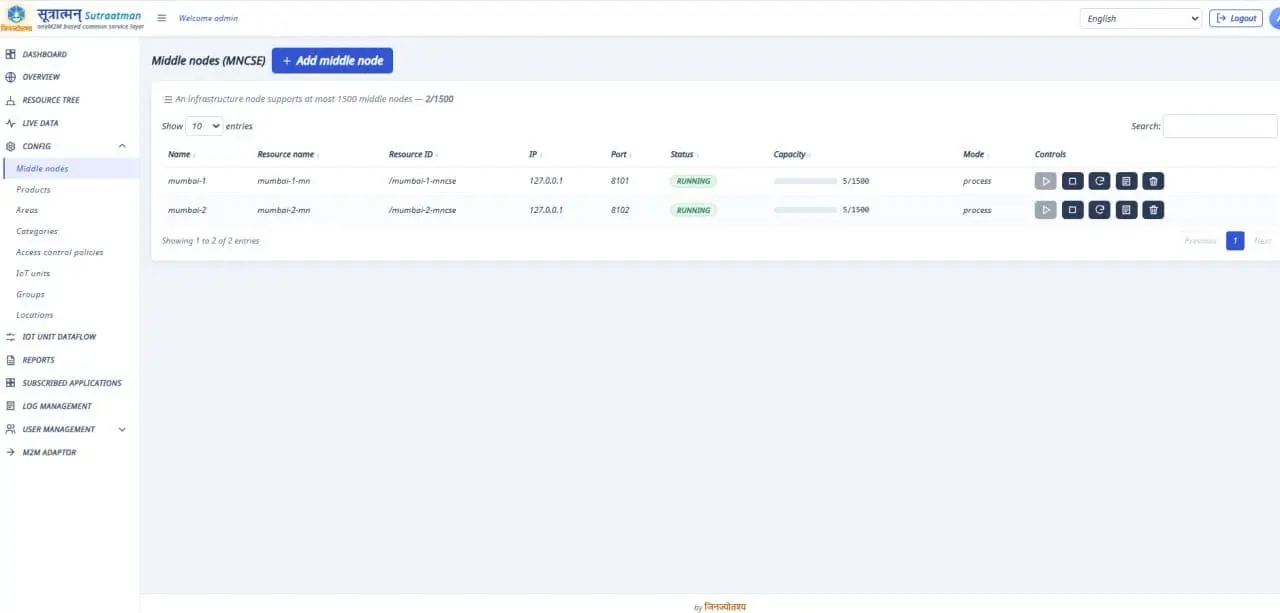
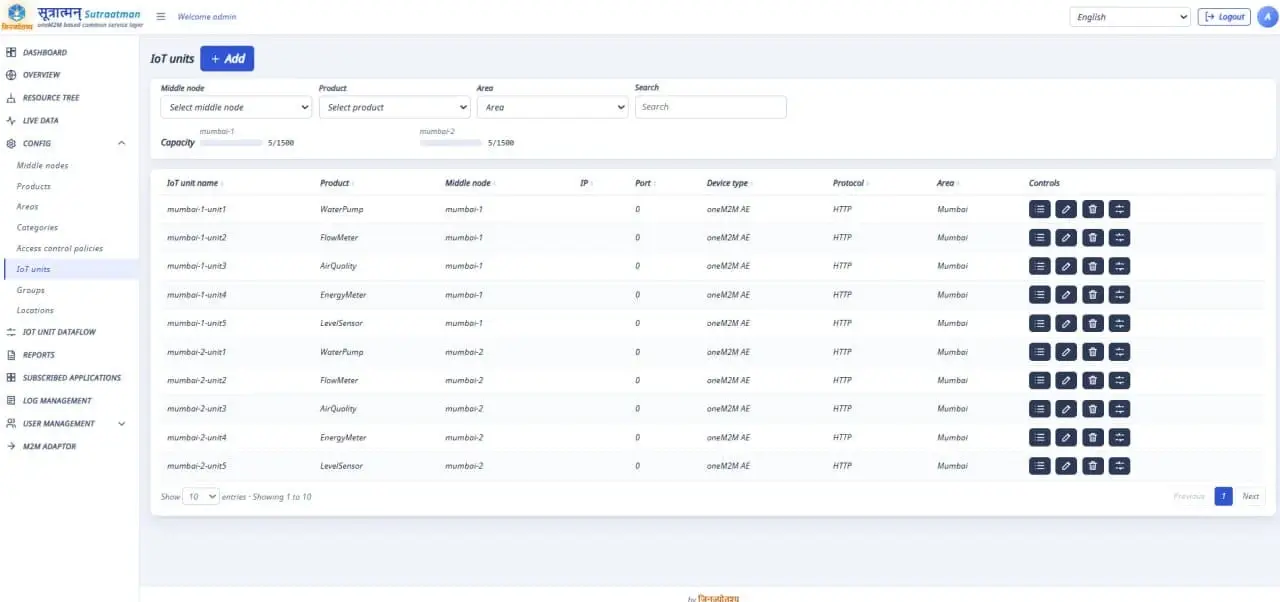
- M2CMiddle nodes, areas, categories and products, access policies, IoT units with default configuration import, groups and locations.
- Users and accessAdmin, Operator and Viewer roles, permissions per middle node or per IoT unit, secure passwords and account lockout.
- Data loggerSubscribes to middle node data and stores it in the console database.
- ReportsLive and historical reports, errors and failed validations, interactive charts and CSV export.
- Log managementLive tail and searchable history of the INCSE, every middle node and the console itself, with log reports and CSV download.
- Subscribed applicationsWhich applications hold subscriptions, their targets and event types, and how many notifications were delivered or failed.
- HousekeepingRetention per data kind, a daily schedule propagated to the CSEs, the history of past runs and a run now button.
- Languages23 languages, English first and Hindi second, with right-to-left layout for Kashmiri, Sindhi and Urdu.
Get started
Prerequisites
- OSWindows or Ubuntu Linux
- RTJava 25 (JDK 25), installed by the setup script if missing
- DBMongoDB, installed by the setup script if missing
- NETPorts 8080 (CSE), 9090 (console), 1883 (MQTT), 8082 (WebSocket) and UDP 5683 (CoAP)
Installation
- Register and download the packageYour link arrives by email after you verify your address. Pick the Windows or Linux package.
- Ubuntu: extract and run the installer
tar xzf sutraatman-1.0.0-linux.tar.gz
cd sutraatman
sudo ./setup/install-ubuntu.sh
Installs JDK 25 and MongoDB when missing, generates random keys, creates the sutraatman-incse and sutraatman-console services and opens the firewall ports if ufw is active. - Windows: unzip, then run in PowerShell as administrator
cd sutraatman
powershell -ExecutionPolicy Bypass -File .\setup\install-windows.ps1
Installs JDK 25 and MongoDB with winget when missing, installs to C:\Sutraatman, registers the start-up tasks and opens the firewall ports. - Open the Management Console
http://<host>:9090
# sign in as admin / admin@123, then set a new password
# CSE health check: http://<host>:8080/_sutraatman/health
The first start builds a small demonstration system by itself: two middle nodes with five IoT units each.
Connecting devices? The device guide walks through registering a device, creating a container, sending data and subscribing, over HTTP, MQTT, WebSocket and CoAP. Questions while installing? Ask in the community forum.
Current release
v1.0.0 released 01 Nov 2026Release notes
- First public release of the Sutraatman CSE and Management Console
- Installers for Windows and Ubuntu that add JDK 25 and MongoDB when missing
- HTTP, MQTT, WebSocket and CoAP protocol bindings
- A demonstration system is built on first start: two middle nodes with five IoT units each
Download
Get Sutraatman free
Register once. We verify your email and send you a private download link.
- Fill in the formName and email are enough.
- Confirm your emailClick the link we send you.
- DownloadYour personal link works for a limited time. Need a new one? Sign in and request it.
Six month free download offer
- Free downloads from this site for six months from 1 November 2026.
- After six months we release the next version of Sutraatman.
- Free for fair use and provided as is, without warranty. See the terms of use.
Check your inbox
We sent a confirmation link to your email. Click it to verify your email and get your download link.
Nothing after a few minutes? Check spam, or . Wrong address? .
You are verified
Your download link is on its way to your inbox and is valid for 48 hours. You can also start it now.
Welcome
You are signed in and verified. Download the latest version or get a fresh link by email.
You are signed in
Welcome back. You can download the software and post in the forum.
This confirmation link has expired
Links work for a limited time. Enter your email and we will send a new one.
This download link has expired
For security, links work for a limited time. Your account is still active, so a new link takes one click.
The download is being updated
We are uploading a new release right now. Your link has not been used up; please try it again a little later.
This sign-in link has expired
Sign-in links work once, for one hour. Request a new one from the sign in page.
Go to sign inWelcome back
This email is already registered. We will not create a second account. Sign in, or we can email you a fresh download link.
You are unsubscribed
You will not receive product news or marketing emails from us any more. Your account and downloads are not affected.
Changed your mind? Update your email preferences.
This link is not valid
The link may be incomplete or too old. Sign in to manage your email preferences.
Go to sign inCheck your inbox
If this email belongs to a verified account, a new download link is on its way.
Community
Discussion forum
Anyone can read. Verified users can post, reply and report. Your download account works here too, no second sign up.
About us
Jupiter Software & Engineering Solutions LLP
JSES provides application led support for industrial automation, valves, flow control and process instrumentation. We review applications and specifications before recommending products, and Sutraatman brings that same engineering approach to IoT software.
Contact
- Sr no 135/A1, H No 757, Govt Colony, Vishrambag, Sangli, Maharashtra 416415, India
- +91 91750 01376
- info@jses-engineering.com